Unreal Engine 5 · Blueprint → C++
Set Timer by Function Name in Unreal Engine 5 C++
The Set Timer by Function Name node maps to GetWorldTimerManager().SetTimer() in C++, which schedules a member function to fire after a delay using an FTimerHandle.
Blueprint node & C++ equivalent
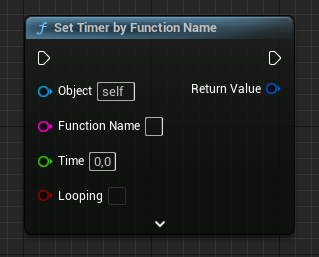
#include "TimerManager.h"

FTimerHandle TimerHandle;

GetWorldTimerManager().SetTimer(
	TimerHandle,                          // Timer handle
	this,                                 // Object to call the timer function on
	&AExampleCharacter::ExampleMethod,    // Method to call the timer function on
	3.0f,                                 // Delay (in seconds)
	false                                 // Loop timer?
);
What does the Set Timer by Function Name node do?
Set Timer schedules a function to run after a set delay instead of calling it immediately, and it can optionally repeat that call on a loop. It is the standard way to defer logic without checking elapsed time inside Tick every frame.
In Blueprint you pick the function by name and supply a duration and a loop flag. The node returns a Timer Handle you can later use to pause, clear, or query the timer.
The C++ equivalent
Include TimerManager.h, then call GetWorldTimerManager().SetTimer(). The overload shown takes an FTimerHandle to write into, the object that owns the function (this), a pointer to the member method such as &AExampleCharacter::ExampleMethod, the delay in seconds as a float, and a bool for whether the timer loops.
The FTimerHandle TimerHandle; should usually be declared as a member of your class so the handle survives past the function call. If the handle goes out of scope you lose the ability to clear or pause that timer later.
How to use it in C++
In the example, SetTimer(TimerHandle, this, &AExampleCharacter::ExampleMethod, 3.0f, false) calls ExampleMethod once after three seconds. Pass true as the final argument to repeat the call every 3 seconds until you clear the timer.
GetWorldTimerManager() is a convenience wrapper around GetWorld()->GetTimerManager(), so both are equivalent. The target method does not need to be a UFUNCTION, but it must be a member of the object you pass as the second argument.
Frequently asked questions
How do I set a timer in Unreal Engine 5 C++?+
Include TimerManager.h and call GetWorldTimerManager().SetTimer(Handle, this, &AYourClass::YourMethod, DelaySeconds, bLoop). Store the FTimerHandle as a class member if you want to clear or pause it later.
How do I make a looping timer in C++?+
Pass true as the final bLoop parameter to SetTimer. The timer will then call your function repeatedly at the specified interval until you call ClearTimer on its handle.
Does the timer function need to be a UFUNCTION?+
No. When you bind by member function pointer like &AExampleCharacter::ExampleMethod, the method does not need the UFUNCTION macro. UFUNCTION is only required when binding by function name string.