Unreal Engine 5 · Blueprint → C++
Get Player Camera Manager in Unreal Engine 5 C++
Get Player Camera Manager maps to UGameplayStatics::GetPlayerCameraManager(this, 0), returning the APlayerCameraManager* that owns the active view for that player.
Blueprint node & C++ equivalent
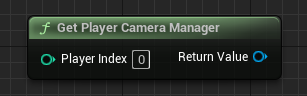
#include "Kismet/GameplayStatics.h"

APlayerCameraManager* PlayerCameraManager = UGameplayStatics::GetPlayerCameraManager(this, 0);
The C++ equivalent
Include Kismet/GameplayStatics.h and call UGameplayStatics::GetPlayerCameraManager(this, 0). The first parameter is a world context object and the second is the zero-based player index, just like Get Player Controller.
When to use it
The APlayerCameraManager exposes the current camera transform through helpers such as GetCameraLocation() and GetCameraRotation(). Use it when you need the actual view position for line traces from the camera, projectile aiming, or screen-space effects, rather than the pawn or controller location.
Frequently asked questions
How do I get the camera location in UE5 C++?+
Get the camera manager with UGameplayStatics::GetPlayerCameraManager(this, 0), then call GetCameraLocation() and GetCameraRotation() on the returned APlayerCameraManager.
What is the difference between the player controller and camera manager?+
The player controller drives input and possession, while the APlayerCameraManager it owns manages the active camera view, blending, and post-process. Use the camera manager when you specifically need the view transform.