Unreal Engine 5 · Blueprint → C++
Event Tick in Unreal Engine 5 C++
The Blueprint Event Tick node corresponds to the virtual Tick(float DeltaTime) function in C++. Override it, call Super::Tick(DeltaTime), and use the DeltaTime parameter for frame-rate-independent movement.
Blueprint node & C++ equivalent
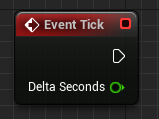
public:
virtual void Tick(float DeltaTime) override;void AExampleActor::Tick(float DeltaTime)
{
Super::Tick(DeltaTime);
// Your code here...
}What does the Event Tick node do?
Event Tick runs every frame and provides Delta Seconds, the time elapsed since the previous frame. It is used for continuous per-frame logic such as smooth movement, interpolation, and polling. The C++ equivalent is the Tick(float DeltaTime) function inherited from AActor.
The C++ equivalent
Declare virtual void Tick(float DeltaTime) override; in the header and implement it in the .cpp, starting with Super::Tick(DeltaTime);. The DeltaTime float matches Blueprint's Delta Seconds pin; multiply movement and timers by it to stay independent of frame rate.
For ticking to actually run, the actor must have ticking enabled, usually via PrimaryActorTick.bCanEverTick = true; in the constructor.
Common mistakes
A frequent issue is an empty Tick that never fires because PrimaryActorTick.bCanEverTick was left false. Another is forgetting to scale values by DeltaTime, which makes movement speed depend on frame rate. Heavy per-frame work in Tick can also hurt performance, so prefer timers or events when continuous updates are not required.
Frequently asked questions
Why is my Tick function not being called in UE5 C++?+
Set PrimaryActorTick.bCanEverTick = true in the constructor. Without it the actor is not registered for ticking and Tick() never runs.
What is DeltaTime in Unreal Engine 5?+
DeltaTime is the seconds elapsed since the last frame. Multiply per-frame movement and timers by it to keep behavior consistent across different frame rates.