Unreal Engine 5 · Blueprint → C++
Set Actor Transform in Unreal Engine 5 C++
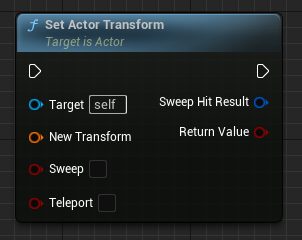
The Blueprint Set Actor Transform node maps to SetActorTransform(FTransform) in C++. Build an FTransform from rotation, location, and scale, then pass it to set all three at once.
Blueprint node & C++ equivalent
AActor* ExampleActor;

FVector NewLocation;
FRotator NewRotation;
FVector NewScale3D;

// Create FTransform (rotation, location and scale)
FTransform NewTransform(NewRotation, NewLocation, NewScale3D);

ExampleActor->SetActorTransform(NewTransform);
What does the Set Actor Transform node do?
Set Actor Transform sets an actor's location, rotation, and scale together in a single call, rather than setting each separately. The transform is applied in world space. In C++ this is AActor::SetActorTransform, which takes an FTransform.
How to use it in C++
Construct the transform with FTransform NewTransform(NewRotation, NewLocation, NewScale3D);. Note the constructor order is rotation, then translation, then scale. With an FRotator NewRotation, FVector NewLocation, and FVector NewScale3D, call ExampleActor->SetActorTransform(NewTransform);.
Using one SetActorTransform call is more efficient than calling SetActorLocation, SetActorRotation, and SetActorScale3D individually when you are updating all three at once.
Frequently asked questions
What is the FTransform constructor argument order in UE5?+
The constructor used here is FTransform(FRotator Rotation, FVector Translation, FVector Scale3D). Rotation comes first, then location, then scale.
Should I use SetActorTransform or set location, rotation, and scale separately?+
Use SetActorTransform when changing all three at once. It applies the combined transform in a single call instead of three separate updates.