Unreal Engine 5 · Blueprint → C++
VInterp To in Unreal Engine 5 C++
The Blueprint VInterp To node eases an FVector toward a target over time. In C++ call FMath::VInterpTo(Current, Target, DeltaTime, InterpSpeed).
Blueprint node & C++ equivalent
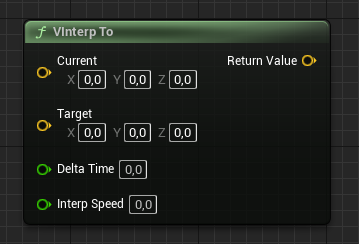
FVector Current;
FVector Target;
float DeltaTime;
float InterpSpeed;

FVector Result = FMath::VInterpTo(Current, Target, DeltaTime, InterpSpeed);
What does the VInterp To node do?
VInterp To is the vector version of FInterp To. It moves a current FVector toward a target FVector at a rate set by InterpSpeed, scaled by DeltaTime. It is commonly used to smoothly move actors, camera offsets, or aim targets.
How to use it in C++
Call FMath::VInterpTo(Current, Target, DeltaTime, InterpSpeed) and store the returned FVector, then assign it back to your current value each frame. This produces smooth, eased motion toward the target.
Use the per-frame DeltaTime so behaviour is consistent regardless of frame rate. For rotation use RInterpTo and for single floats use FInterpTo.
Frequently asked questions
How do I smoothly move a vector toward a target in UE5 C++?+
Call FMath::VInterpTo(Current, Target, DeltaTime, InterpSpeed) each tick and feed the result back into your current vector.
What is the difference between VInterpTo and FInterpTo?+
VInterpTo interpolates an FVector, while FInterpTo interpolates a single float. Both share the same Current/Target/DeltaTime/InterpSpeed signature.