Unreal Engine 5 · Blueprint → C++
Add to Viewport in Unreal Engine 5 C++
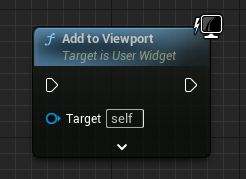
The Add to Viewport Blueprint node corresponds to UUserWidget::AddToViewport() in C++, which renders a previously created widget on top of the game viewport.
Blueprint node & C++ equivalent
#include "Blueprint/UserWidget.h"

UUserWidget* ExampleWidget;

ExampleWidget->AddToViewport();
What does the Add to Viewport node do?
Add to Viewport takes a widget instance and draws it over the player's screen. It is the step that makes a widget actually visible after CreateWidget constructs it.
The optional ZOrder parameter controls layering when multiple widgets overlap. Higher ZOrder values draw on top of lower ones.
The C++ equivalent
Call AddToViewport() directly on the UUserWidget* returned by CreateWidget. Include Blueprint/UserWidget.h so the type and method are visible. You can pass an integer ZOrder argument, for example ExampleWidget->AddToViewport(10).
Keep a reference to the widget pointer if you plan to remove or update it later, otherwise you lose the handle needed for RemoveFromParent().
When to use it
Use AddToViewport for full-screen HUDs, menus, and overlays that should cover the whole screen. For widgets that belong inside another widget's layout, add them as children instead of calling AddToViewport.
It is also possible to add a widget to a specific player's screen with AddToPlayerScreen in split-screen scenarios.
Frequently asked questions
How do you add a widget to the viewport in UE5 C++?+
Call AddToViewport() on a valid UUserWidget pointer, for example ExampleWidget->AddToViewport(). The widget must already be created with CreateWidget.
How do I control widget draw order with AddToViewport?+
Pass a ZOrder integer to AddToViewport, such as AddToViewport(10). Widgets with a higher ZOrder render on top of those with a lower value.