Unreal Engine 5 · Blueprint → C++
Set Input Mode Game and UI in Unreal Engine 5 C++
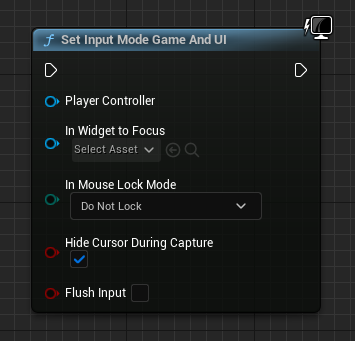
The Set Input Mode Game and UI Blueprint node maps to constructing an FInputModeGameAndUI struct and passing it to APlayerController::SetInputMode(), letting both the game and UI receive input.
Blueprint node & C++ equivalent
#include "Kismet/GameplayStatics.h"

// Get player controller
APlayerController* PlayerController = UGameplayStatics::GetPlayerController(this, 0);

if (PlayerController)
{
	// Set input mode
	FInputModeGameAndUI InputMode;
	PlayerController->SetInputMode(InputMode);
}
What does Set Input Mode Game and UI do?
It delivers input to both gameplay and on-screen widgets at the same time. Use it for in-game HUDs that have clickable elements while the player still controls their character.
The mouse can interact with the UI while gameplay input continues, which suits inventory screens, build menus, and overlays.
The C++ equivalent
Get the controller from UGameplayStatics::GetPlayerController(this, 0), create an FInputModeGameAndUI struct, and call PlayerController->SetInputMode(InputMode). Include Kismet/GameplayStatics.h.
FInputModeGameAndUI supports options such as SetHideCursorDuringCapture and SetLockMouseToViewportBehavior, which fine-tune cursor behavior while gameplay is still active.
When to use it
Choose Game And UI when both systems must stay live, for example a strategy overlay or a heads-up menu. Switch to Game Only for pure gameplay or UI Only for blocking full-screen menus.
Set the mouse cursor visibility explicitly with SetShowMouseCursor(true) so players can see what they are clicking.
Frequently asked questions
How do you set input mode to game and UI in UE5 C++?+
Create an FInputModeGameAndUI struct and call PlayerController->SetInputMode(InputMode). Retrieve the controller with UGameplayStatics::GetPlayerController(this, 0).
When should I use Game and UI instead of UI Only?+
Use Game and UI when the player should keep controlling the game while also interacting with widgets, such as an in-game HUD. UI Only blocks all gameplay input.