Unreal Engine 5 · Blueprint → C++
Draw Debug Line in Unreal Engine 5 C++
Draw Debug Line maps to the global DrawDebugLine() function, which renders a colored line between two points for visual debugging.
Blueprint node & C++ equivalent
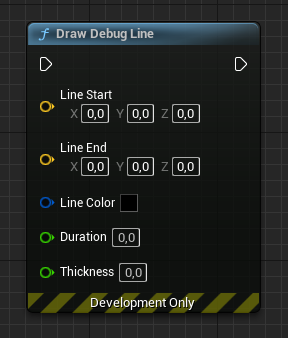
FVector Start;
FVector End;

DrawDebugLine(
	GetWorld(),        // World object
	Start,             // Start of the line
	End,               // End of the line
	FColor::Red,       // Line color
	false,             // Persistent?
	5.0f,              // Duration
	0,                 // Depth priority
	1.0f               // Line thickness
);
What does Draw Debug Line do?
Draw Debug Line renders a temporary line in the world, most often to visualize line traces, aim directions, or distances between actors. It is a debugging tool and is not visible in shipping builds by default.
The line can persist or fade after a set duration.
The C++ equivalent
Call the global DrawDebugLine() function (from DrawDebugHelpers.h), passing GetWorld() as the world, the FVector start, the FVector end, an FColor such as FColor::Red, a persistent bool, a duration in seconds, a depth priority, and the line thickness.
Setting persistent to false with a 5.0f duration draws the line for five seconds before it disappears.
Frequently asked questions
How do I draw a debug line in UE5 C++?+
Call DrawDebugLine(GetWorld(), Start, End, FColor::Red, false, 5.0f, 0, 1.0f). Include DrawDebugHelpers.h to access it.
Why is my debug line not showing up?+
Make sure GetWorld() is valid, the duration is greater than zero (or persistent is true), and you are running in a non-shipping build where debug drawing is enabled.