Unreal Engine 5 · Blueprint → C++
Project World to Screen in Unreal Engine 5 C++
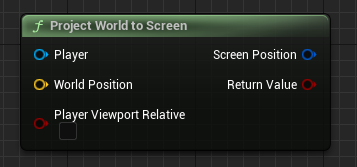
Project World to Screen is UGameplayStatics::ProjectWorldToScreen(), converting a 3D FVector world location into 2D FVector2D screen coordinates for a player.
Blueprint node & C++ equivalent
#include "Kismet/GameplayStatics.h"

// Get player controller
APlayerController* PlayerController = UGameplayStatics::GetPlayerController(this, 0);

FVector WorldPosition;

// Result is stored in this vector
FVector2D ScreenPosition;

UGameplayStatics::ProjectWorldToScreen(
	PlayerController,                  // Target player
	WorldPosition,                     // World position
	ScreenPosition,                    // (Output) Screen position
	false                              // Player viewport relative?
);
What does Project World to Screen do?
This node takes a point in 3D world space and computes where it appears on the player's 2D screen. It is the standard way to position health bars, markers, and waypoint icons over world actors.
The result is written into an out-parameter and the function returns whether the point was successfully projected (it can fail if the point is behind the camera).
The C++ equivalent
First get the local controller with UGameplayStatics::GetPlayerController(this, 0). Then call UGameplayStatics::ProjectWorldToScreen(), passing the player controller, the FVector world position, an FVector2D output reference for the screen position, and a bool for viewport-relative coordinates.
Both ProjectWorldToScreen and the player controller helper live in Kismet/GameplayStatics.h.
Frequently asked questions
How do I convert a world position to screen coordinates in UE5 C++?+
Call UGameplayStatics::ProjectWorldToScreen() with the player controller, the world FVector, and an FVector2D output. It returns the on-screen pixel position.
Why does ProjectWorldToScreen return false?+
It returns false when the world point is behind the camera or off-screen and cannot be projected. Check the return value before using the screen coordinates.