Unreal Engine 5 · Blueprint → C++
Set Game Paused in Unreal Engine 5 C++
Set Game Paused maps to UGameplayStatics::SetGamePaused(this, bPaused), which pauses or resumes gameplay based on a bool.
Blueprint node & C++ equivalent
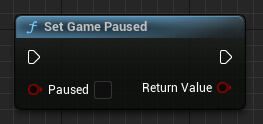
#include "Kismet/GameplayStatics.h"

bool bPaused;

UGameplayStatics::SetGamePaused(this, bPaused);
What does Set Game Paused do?
This node halts gameplay time when set to true and resumes it when set to false. While paused, actor ticks stop but UI and input that allow pausing continue, which is how pause menus stay interactive.
It returns whether the pause state changed successfully.
The C++ equivalent
After including Kismet/GameplayStatics.h, call UGameplayStatics::SetGamePaused(this, bPaused). The first argument is the world context object and the second is the desired paused state.
For input to keep working during a pause, configure the relevant input mode and ensure the player controller or widgets are set to tick while paused.
Frequently asked questions
How do I pause the game in UE5 C++?+
Call UGameplayStatics::SetGamePaused(this, true) to pause and false to resume. It is declared in Kismet/GameplayStatics.h.
Why does my pause menu stop responding when paused?+
Widgets and controllers that should react during a pause need to be allowed to tick while paused. Set the appropriate tick-while-paused behavior so input still flows.