Unreal Engine 5 · Blueprint → C++
Distance (Vector) in Unreal Engine 5 C++
The Blueprint Distance (Vector) node returns the distance between two points. In C++ use the static helper FVector::Distance(A, B).
Blueprint node & C++ equivalent
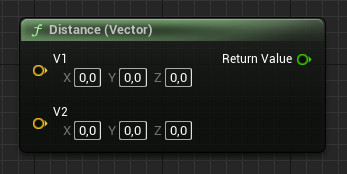
FVector A;
FVector B;

FVector::Distance(A, B);
What does the Distance node do?
Distance computes the straight-line distance between two world positions, A and B. It is equivalent to taking the length of the vector (A - B). In Unreal Engine 5 the static function FVector::Distance does this in one call.
The C++ equivalent
Call the static function FVector::Distance(A, B) with your two FVector arguments. It returns a double representing the distance between them.
For range checks, FVector::DistSquared(A, B) avoids the square root and is faster when you only compare against a squared threshold.
Frequently asked questions
How do I find the distance between two vectors in C++?+
Call the static function FVector::Distance(A, B). It returns the Euclidean distance between the two points.
Is there a faster way to compare distances in UE5?+
Yes. Use FVector::DistSquared(A, B) and compare against your threshold squared to avoid the square root cost.