Unreal Engine 5 · Blueprint → C++
Normalize (Vector) in Unreal Engine 5 C++
The Blueprint Normalize (Vector) node rescales a vector to unit length. In C++ call ExampleVector.Normalize(Tolerance), which normalizes the FVector in place and returns whether it succeeded.
Blueprint node & C++ equivalent
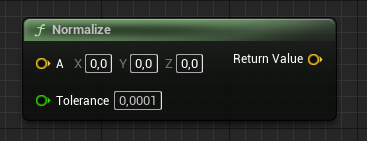
FVector ExampleVector;

float Tolerance;

// Normalizes the vector in-place
ExampleVector.Normalize(Tolerance);
What does the Normalize node do?
Normalize divides a vector by its own length so it keeps its direction but has a magnitude of 1. The Tolerance argument guards against dividing by a near-zero length; if the vector is shorter than the tolerance, it is left unchanged.
The C++ equivalent
ExampleVector.Normalize(Tolerance) modifies the vector in place and returns a bool indicating success. This differs from the Blueprint node, which outputs a new normalized vector rather than mutating the original.
If you want a normalized copy without changing the source, call ExampleVector.GetSafeNormal(Tolerance) instead, which returns a new FVector.
Frequently asked questions
How do I normalize a vector in UE5 C++?+
Call MyVector.Normalize(Tolerance) to scale it to unit length in place. It returns true on success.
What is the difference between Normalize and GetSafeNormal?+
Normalize() changes the vector in place and returns a bool; GetSafeNormal() leaves the original untouched and returns a new normalized FVector.