Unreal Engine 5 · Blueprint → C++
Make Vector in Unreal Engine 5 C++
The Blueprint Make Vector node maps to the FVector(X, Y, Z) constructor in C++, building a 3D vector from three float components.
Blueprint node & C++ equivalent
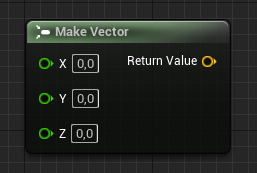
float X;
float Y;
float Z;

FVector ExampleVector(X, Y, Z);
What does the Make Vector node do?
Make Vector packs three float values into a single FVector representing X, Y, and Z. In C++ you do this directly with the constructor: FVector ExampleVector(X, Y, Z);. FVector is a core engine type used for locations, directions, and scales.
How to use it in C++
Declare the vector with FVector ExampleVector(X, Y, Z);. Note that in UE5 FVector components are double-precision by default, so passing float values is implicitly promoted. Useful constants include FVector::ZeroVector and FVector::OneVector when you do not need custom components.
Frequently asked questions
How do I make a vector in UE5 C++?+
Use the constructor FVector ExampleVector(X, Y, Z);, which is the C++ equivalent of the Make Vector Blueprint node.
Are FVector components float or double in UE5?+
In Unreal Engine 5, FVector uses double-precision components by default, so float inputs are promoted automatically.