Unreal Engine 5 · Blueprint → C++
Nearly Equal in Unreal Engine 5 C++
The Blueprint Nearly Equal node maps to FMath::IsNearlyEqual(A, B, ErrorTolerance) in C++, comparing two floats within a tolerance.
Blueprint node & C++ equivalent
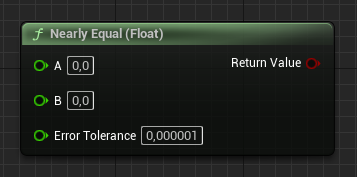
float A;
float B;
float ErrorTolerance;

bool Result = FMath::IsNearlyEqual(A, B, ErrorTolerance);
What does the Nearly Equal node do?
Nearly Equal checks whether two floating-point numbers are close enough to be treated as equal, avoiding the precision pitfalls of comparing floats directly with ==. FMath::IsNearlyEqual(A, B, ErrorTolerance) returns a bool that is true when the absolute difference between A and B is at most ErrorTolerance.
How to use it in C++
Write bool Result = FMath::IsNearlyEqual(A, B, ErrorTolerance);. If you omit the tolerance, the overload defaults to KINDA_SMALL_NUMBER. There is also FMath::IsNearlyZero(Value) for checking whether a single value is approximately zero.
Frequently asked questions
How do I compare two floats in UE5 C++?+
Use FMath::IsNearlyEqual(A, B, ErrorTolerance) instead of ==, so small floating-point rounding differences do not cause false negatives.
What is the default tolerance for IsNearlyEqual?+
When you do not pass an ErrorTolerance, FMath::IsNearlyEqual uses KINDA_SMALL_NUMBER, a small epsilon value defined by the engine.