Unreal Engine 5 · Blueprint → C++
Play Sound 2D in Unreal Engine 5 C++
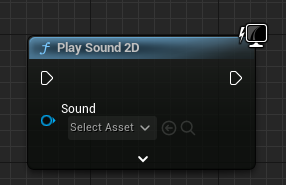
Play Sound 2D maps to UGameplayStatics::PlaySound2D, which plays a non-spatialized USoundBase such as UI clicks or music at a fixed volume and pitch.
Blueprint node & C++ equivalent
private:
	// The sound needs to be set in blueprint
	UPROPERTY(EditAnywhere, meta = (AllowPrivateAccess = "true"))
USoundBase* ExampleSound;#include "Kismet/GameplayStatics.h"
if (ExampleSound)
{
UGameplayStatics::PlaySound2D(
this, // World context object
ExampleSound, // Sound
1.0f, // Volume multiplier
1.0f // Pitch multiplier
);
}Set up the sound reference
Declare USoundBase* ExampleSound as a UPROPERTY(EditAnywhere) so you can assign a Sound Wave or Sound Cue in the editor. USoundBase is the common base type for both.
The C++ equivalent
Include Kismet/GameplayStatics.h and call UGameplayStatics::PlaySound2D(this, ExampleSound, 1.0f, 1.0f). The arguments are a world context object, the sound, a volume multiplier, and a pitch multiplier. Check if (ExampleSound) first so you do not pass null.
When to use it
Play Sound 2D ignores world position, making it ideal for interface sounds, narration, and music that should sound the same regardless of where the listener is. For sounds that should attenuate with distance, use PlaySoundAtLocation instead.
Frequently asked questions
How do I play a 2D sound in UE5 C++?+
Call UGameplayStatics::PlaySound2D(this, Sound, 1.0f, 1.0f) after including Kismet/GameplayStatics.h, where Sound is a USoundBase* set in the editor.
What is the difference between PlaySound2D and PlaySoundAtLocation?+
PlaySound2D plays without spatialization at a constant volume, while PlaySoundAtLocation positions the sound in the world so it attenuates and pans based on the listener.