Unreal Engine 5 · Blueprint → C++
Play Sound At Location in Unreal Engine 5 C++
Play Sound At Location maps to UGameplayStatics::PlaySoundAtLocation, which plays a spatialized USoundBase at a world-space FVector so it attenuates with distance.
Blueprint node & C++ equivalent
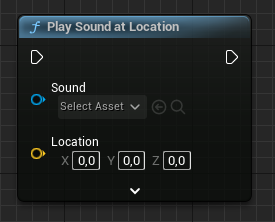
private:
	// The sound needs to be set in blueprint
	UPROPERTY(EditAnywhere, meta = (AllowPrivateAccess = "true"))
USoundBase* ExampleSound;#include "Kismet/GameplayStatics.h"
FVector Location;
if (ExampleSound)
{
UGameplayStatics::PlaySoundAtLocation(
this, // World context object
ExampleSound, // Sound
Location, // Location
1.0f, // Volume multiplier
1.0f // Pitch multiplier
);
}Set up the sound reference
Declare USoundBase* ExampleSound as a UPROPERTY(EditAnywhere) to assign the sound asset in the editor. As with 2D sounds, USoundBase covers both Sound Waves and Sound Cues.
The C++ equivalent
Include Kismet/GameplayStatics.h and call UGameplayStatics::PlaySoundAtLocation(this, ExampleSound, Location, 1.0f, 1.0f). The Location is an FVector in world space, followed by volume and pitch multipliers. Guard the call with if (ExampleSound) to avoid passing null.
When to use it
Use this for diegetic sounds tied to a position, such as explosions, footsteps, or ambient emitters, where falloff and panning matter. Attenuation and spatialization come from the asset's settings. For interface or music that should not be positioned, use PlaySound2D.
Frequently asked questions
How do I play a sound at a location in UE5 C++?+
Call UGameplayStatics::PlaySoundAtLocation(this, Sound, Location, 1.0f, 1.0f) with a USoundBase* and an FVector world position after including Kismet/GameplayStatics.h.
Why does my PlaySoundAtLocation sound not attenuate?+
Attenuation comes from the sound asset's attenuation settings, not the function. Assign an attenuation setting to the Sound Cue or Sound Wave so distance falloff applies.