Unreal Engine 5 · Blueprint → C++
Branch Node in Unreal Engine 5 C++
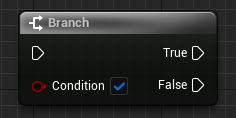
The Blueprint Branch node is a standard C++ if / else statement. It evaluates a bool condition and runs the True path when the condition is true, otherwise the False path.
Blueprint node & C++ equivalent
bool ExampleCondition;

if (ExampleCondition)
{
	// True...
}
else
{
	// False...
}
What does the Branch node do?
The Branch node takes a single boolean Condition pin and splits execution into two outputs: True and False. It is the most common flow-control node in Blueprints and is used wherever a decision needs to be made.
In C++ this is expressed with the if keyword evaluating a bool, followed by an optional else block for the False path.
The C++ equivalent
Declare a bool and test it directly. The body of the if block corresponds to the Branch node's True execution pin, and the else block corresponds to the False pin.
If you only need to act on the True case, you can omit the else block entirely, just like leaving the Branch node's False pin unconnected.
Common mistakes
Avoid using assignment (=) instead of comparison (==) inside the condition, since if (x = true) assigns rather than tests. When checking a plain bool, write if (ExampleCondition) directly rather than if (ExampleCondition == true), which is the idiomatic Unreal C++ style.
Frequently asked questions
What is the C++ equivalent of the Branch node in UE5?+
It is a C++ if statement. The True execution pin becomes the if block body and the False pin becomes the else block.
Do I need an else block for a Branch in C++?+
No. The else block is optional, just like the Branch node's False pin. Omit it if you only need to handle the True case.