Unreal Engine 5 · Blueprint → C++
Flip Flop Node in Unreal Engine 5 C++
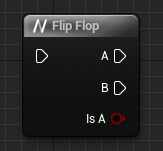
The Blueprint Flip Flop node is a persistent bool member that alternates between two execution paths. Each call runs path A or path B, then flips the boolean for next time.
Blueprint node & C++ equivalent
private:
bool IsA = true;if (IsA)
{
// A...
}
else
{
// B...
}
IsA = !IsA;What does the Flip Flop node do?
The Flip Flop node alternates execution between its A and B outputs each time it is called, and exposes an Is A boolean reporting whether the current call took the A path. The first call goes out A, the next out B, and so on.
Because it must remember its state between calls, the C++ equivalent needs a member variable rather than a local variable.
The C++ equivalent
Declare a bool IsA = true; as a member in the .h file so the value persists across calls. In the .cpp, branch on it with if (IsA) for path A and else for path B, then toggle it with IsA = !IsA;.
The IsA member maps to the Flip Flop node's Is A output. Negating it with ! at the end of the logic ensures the next call takes the opposite path.
Common mistakes
Do not declare IsA as a local variable inside the function. A local resets every call and would always take the same path. It must be a class member so the toggle state survives between invocations.
Frequently asked questions
How do you implement the Flip Flop node in Unreal C++?+
Use a persistent bool member, branch on it with if/else for paths A and B, then flip it with IsA = !IsA; at the end so the next call takes the other path.
Why must the Flip Flop bool be a member variable?+
The node remembers which path it took last time, so the boolean must persist between calls. A local variable resets each call and would never alternate.