Unreal Engine 5 · Blueprint → C++
For Each Loop with Break in Unreal Engine 5 C++
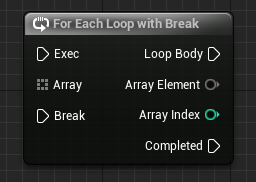
The Blueprint For Each Loop with Break node is a range-based C++ for loop over a TArray with a break statement to exit early.
Blueprint node & C++ equivalent
TArray<int32> ExampleArray;

bool ExampleBreakCondition;

for (int32 Element : ExampleArray)
{
	if (ExampleBreakCondition) { break; }
	// Loop Body...
}
What does the For Each Loop with Break node do?
This node iterates over an array like a normal For Each Loop, but a Break input lets you stop early. When Break triggers, iteration ends immediately and execution moves to the Completed pin.
In C++ this combines a range-based for loop with the break keyword to leave the loop the moment a condition is met.
The C++ equivalent
Loop with for (int32 Element : ExampleArray) and check your condition inside the body: if (ExampleBreakCondition) { break; }. The break stops iteration over the TArray without visiting remaining elements.
This is useful for search-style logic, where you scan elements until you find a match and then stop, avoiding wasted work on the rest of the array.
Frequently asked questions
How do you break out of a range-based for loop in UE5?+
Use the break keyword inside the loop body. It exits the range-based for loop over the TArray immediately, matching the Blueprint Break input.
When should I use For Each with Break instead of a plain For Each?+
Use it when you can stop early, such as finding the first matching element, so you avoid iterating the rest of the array unnecessarily.