Unreal Engine 5 · Blueprint → C++
For Each Loop in Unreal Engine 5 C++
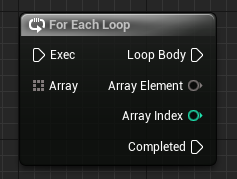
The Blueprint For Each Loop node is a range-based C++ for loop over a TArray. It runs the loop body once for every element in the container.
Blueprint node & C++ equivalent
TArray<int32> ExampleArray;

for (int32 Element : ExampleArray)
{
	// Loop Body...
}
What does the For Each Loop node do?
The For Each Loop node iterates over every element of an array, exposing the current Element and Array Index on each pass. It is the Blueprint way to walk a container without managing a counter manually.
In C++ this is a range-based for loop, which iterates directly over the contents of a TArray from start to finish.
The C++ equivalent
Write for (int32 Element : ExampleArray) to loop over a TArray<int32>. Each iteration binds Element to the next value in the array, matching the node's Array Element output.
Use the element type that matches your array. For a TArray<int32> iterate over int32; for arrays of objects, iterate over a pointer or a const reference such as const FMyStruct& to avoid copying.
When to use it
Use a range-based loop when you need each element but not necessarily its index. To avoid copying larger elements, iterate by reference, for example for (FMyStruct& Element : ExampleArray), which also lets you modify elements in place.
Frequently asked questions
How do you loop over a TArray in Unreal C++?+
Use a range-based for loop: for (int32 Element : ExampleArray). This is the C++ equivalent of the Blueprint For Each Loop node.
Should I iterate a TArray by value or by reference?+
Iterate by reference (Type& Element or const Type&) for larger types to avoid copies, and use a non-const reference when you need to modify elements in place.