Unreal Engine 5 · Blueprint → C++
Play Animation on a Skeletal Mesh Component in UE5 C++
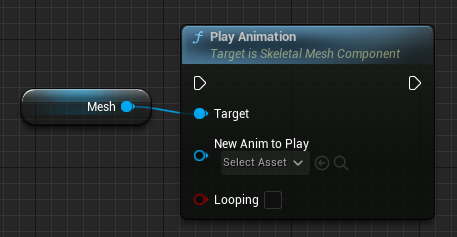
The Play Animation node maps to USkeletalMeshComponent::PlayAnimation, which plays a single UAnimationAsset directly on a skeletal mesh component, with a second argument controlling whether it loops.
Blueprint node & C++ equivalent
private:
	// The animation asset needs to be set in blueprint
	UPROPERTY(EditAnywhere, meta = (AllowPrivateAccess = "true"))
class UAnimationAsset* ExampleAnimation;USkeletalMeshComponent* ExampleComponent;
if (ExampleAnimation)
{
ExampleComponent->PlayAnimation(
ExampleAnimation, // Animation asset
false // Loop animation?
);
}What does the Play Animation node do?
Play Animation puts a skeletal mesh into single-asset playback mode and plays the supplied animation immediately. It bypasses the Animation Blueprint and drives the mesh straight from the UAnimationAsset, which is why it is typically used for simple props or cutscene meshes rather than gameplay characters.
In C++ the equivalent call is ExampleComponent->PlayAnimation(ExampleAnimation, false), where the first argument is the asset and the second is the loop flag.
The C++ equivalent
Expose the animation asset so a designer can set it in the editor by declaring a UPROPERTY(EditAnywhere) pointer of type UAnimationAsset* in the header. The AllowPrivateAccess meta tag lets you keep the member private while still editing it in the Details panel.
Always null-check the asset before calling PlayAnimation, because the pointer is empty until it is assigned in Blueprint or in the constructor.
Frequently asked questions
What is the C++ equivalent of the Play Animation Blueprint node?+
It is USkeletalMeshComponent::PlayAnimation(AnimationAsset, bLooping). Pass the UAnimationAsset to play and a bool for whether it should loop.
What is the difference between PlayAnimation and PlayAnimMontage in UE5?+
PlayAnimation plays a raw UAnimationAsset in single-node mode and ignores the Animation Blueprint, while montages play through the Anim Instance and require an UAnimMontage plus a montage slot.