Unreal Engine 5 · Blueprint → C++
Set World Location on a Component in UE5 C++
The Set World Location node maps to USceneComponent::SetWorldLocation, which places a component at an absolute position in the world using an FVector, regardless of its parent.
Blueprint node & C++ equivalent
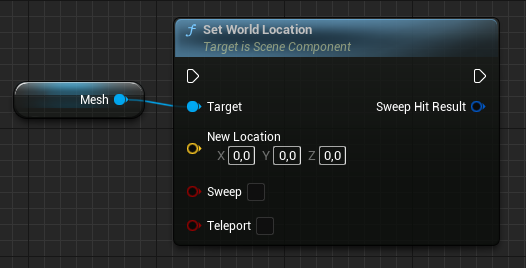
USkeletalMeshComponent* ExampleComponent;

FVector NewLocation;

ExampleComponent->SetWorldLocation(NewLocation);
What does Set World Location do?
Set World Location moves a component to an exact spot in world space. Unlike relative location, the value is not offset by the parent's transform, so the same FVector always points to the same place in the level. The call is ExampleComponent->SetWorldLocation(NewLocation).
If the component is attached to a parent, Unreal internally recomputes the relative transform needed to land at the requested world position.
When to use it in C++
Reach for SetWorldLocation when you have a world-space target, such as a hit result, a navigation point, or a coordinate from another actor's GetActorLocation. Use SetRelativeLocation when you instead want to keep a fixed offset from the parent.
Both functions accept optional sweep and teleport parameters if you need physics-aware movement or hit feedback.
Frequently asked questions
What is the C++ equivalent of Set World Location in UE5?+
It is USceneComponent::SetWorldLocation(FVector), which sets the component's absolute world-space position.
Does SetWorldLocation ignore the component's parent?+
Yes. The location is interpreted in world coordinates, and Unreal adjusts the relative transform under the hood so the component lands at that world position.