Unreal Engine 5 · Blueprint → C++
Set World Rotation on a Component in UE5 C++
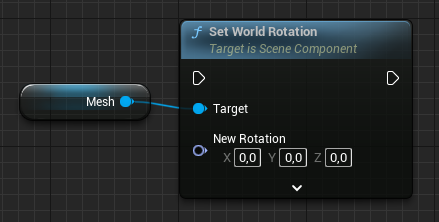
The Set World Rotation node maps to USceneComponent::SetWorldRotation, which orients a component in absolute world space. Convert your FRotator with FQuat::MakeFromRotator for the quaternion overload.
Blueprint node & C++ equivalent
USkeletalMeshComponent* ExampleComponent;

FRotator NewRotation;

// Convert FRotator to FQuat and set world rotation
ExampleComponent->SetWorldRotation(FQuat::MakeFromRotator(NewRotation));
The C++ equivalent
Set World Rotation sets a component's orientation in world space, ignoring the parent's rotation. The example calls ExampleComponent->SetWorldRotation(FQuat::MakeFromRotator(NewRotation)), converting the FRotator into an FQuat first. If the component is attached, Unreal recomputes the relative rotation needed to achieve that world orientation.
An FRotator overload also exists, so SetWorldRotation(NewRotation) is valid too.
When to use it in C++
Use SetWorldRotation when you have a world-space orientation, for example aiming a turret at a target with FRotationMatrix or UKismetMathLibrary::FindLookAtRotation. Use SetRelativeRotation when the component should keep a fixed orientation relative to its parent.
The quaternion form shown here is the recommended path for smooth, accurate rotation.
Frequently asked questions
What is the C++ equivalent of the Set World Rotation node?+
It is USceneComponent::SetWorldRotation, called here as SetWorldRotation(FQuat::MakeFromRotator(NewRotation)) to set an absolute world orientation.
What is the difference between Set World Rotation and Set Relative Rotation?+
Set World Rotation is in absolute world space, while Set Relative Rotation is measured from the component's attachment parent.