Unreal Engine 5 · Blueprint → C++
Set Relative Location on a Component in UE5 C++
The Set Relative Location node maps to USceneComponent::SetRelativeLocation, which positions a component relative to its parent using an FVector offset.
Blueprint node & C++ equivalent
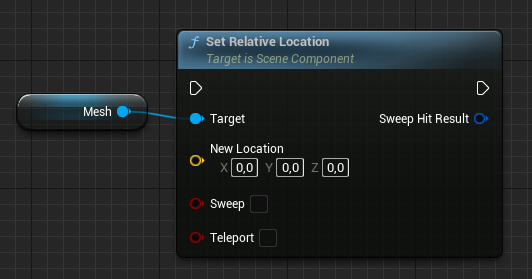
USkeletalMeshComponent* ExampleComponent;

FVector NewLocation;

ExampleComponent->SetRelativeLocation(NewLocation);
What does Set Relative Location do?
Set Relative Location moves a component to a position expressed relative to its attachment parent, not in world space. A relative location of zero means the component sits exactly at its parent's origin. This is the right call when you want a child component to keep a fixed offset as the parent moves.
The C++ form is ExampleComponent->SetRelativeLocation(NewLocation), where NewLocation is an FVector.
When to use it in C++
Use SetRelativeLocation for components that are attached to something and should track that parent, such as a weapon offset on a character or a camera mounted on a spring arm. For absolute placement in the level, use SetWorldLocation instead.
Optional parameters let you sweep for collisions or capture the resulting hit, but the basic overload simply teleports the component to the new relative position.
Frequently asked questions
What is the C++ function for the Set Relative Location node?+
It is USceneComponent::SetRelativeLocation(FVector). It sets the component's position relative to its parent.
What is the difference between SetRelativeLocation and SetWorldLocation?+
SetRelativeLocation is measured from the component's parent, while SetWorldLocation is measured in absolute world coordinates regardless of attachment.